 Fridgedoor
· Katz
How to Send Service Reminders That Actually Get Bookings
A service reminder only works if the customer can act on it in one tap. Here is what to say, when to send it, and how to handle the replies.
· Katz
A service reminder only works if the customer can act on it in one tap. Here is what to say, when to send it, and how to handle the replies.
Send a short reminder that names the vehicle, holds a specific time and gives the customer one tap to confirm, pick another time or ask for a call. Send it early enough to book around, follow up once, and make sure every reply lands with a real person. That is the difference between a reminder that gets read and a reminder that fills your bays.
The rest of this post explains each part, what the research says, and where most reminder systems quietly fall apart.
Mostly because they forget, and because the reminder asks too much of them.
A study of a dietetic clinic in Malaysia found that forgetting an appointment, or remembering the wrong date, was the biggest reason people missed it, at 35.3 percent of cases. [https://ejournal.ukm.my/jskm/article/view/34891] That clinic is not a garage, but the human problem is the same. Nobody wakes up planning to skip their service. Life just gets louder than a due date.
The second reason is effort. A reminder that says "Your service is due, please call us to book" asks the customer to find a number, make time for a phone call and work out which days suit them. Plenty of people will mean to do it and never get round to it.
In our view, the best reminder removes every step it can.
Yes, the evidence is consistent, with one honest caveat. Nearly all the published research is from healthcare, not vehicle servicing. Treat it as strong evidence that the mechanism works, not a promise of specific results for your workshop.
Wording matters too. A large study of more than 161,000 health fund members sent every patient a pre-appointment reminder messages, with a link to confirm or cancel. The message wording changed the results, and the version that stated the actual cost of a missed appointment performed best.
Five things, in this order:
Here is an example of a message that follows those rules. The business is made up.
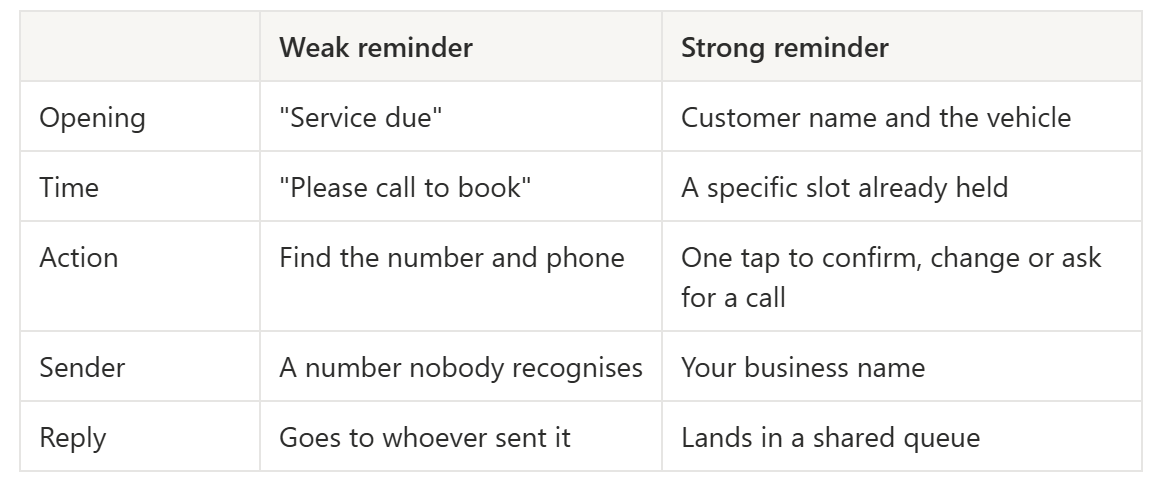
Hi Jane, the inspection on your CX-5 is due this month. We have held Thu 20 Aug, 8:30 am at Petone, Bay 3 for you. Tap to confirm, pick another time or ask us to call: [link]. Northwind Garages
And here is how it compares with the kind of reminder most customers get.
There is no single proven answer for vehicle servicing, so this part is opinion, not research.
Our rule of thumb is to think of two different jobs:
Send one follow-up to anyone who has not responded, then stop. Two messages feels helpful. Four starts to feel like pressure.
Test your own timing. Run one cohort at two weeks and another at three, then compare how many confirm. Your customers are the only data that really counts.
Give them a link, not a task.
The simplest version is a text with a link that opens a page on their phone. No app to install, no login, no password to forget. The page shows the slot you have held, and they tap confirm, choose another time, decline or ask for a call back.
Two details make this work better:
This is the approach we built Fridgedoor around. Each reminder carries a link that is good for one customer, and whatever they choose comes back to your team as a thread. Here is how that works step by step.
This is where many reminder systems fall apart. The booking is the easy part. The replies are the hard part.
Customers do not always tap the button. Sometimes they write back with a question, like "Can I come in the afternoon instead?" or "Is it the same price as last time?" or "Can you look at two cars?" If that message sits on one person's phone while they are busy working on a car, the customer is left waiting. The longer they wait, the more likely they are to book somewhere else.
For a business with more than one branch it gets harder. A reply lands at the wrong location. Someone is off sick. Two people answer the same customer and say different things.
What helps:
We wrote about why reply speed and plain language matter more than the tool you use in our post on customer communication. The reminder gets the customer's attention. The reply is what earns the booking.
Look at each batch of reminders as a run, and track three numbers:
Divide replies by sent to get your response rate. Then compare across runs, wording versions and branches. If one branch consistently converts better, find out what they do differently. It might be their opening hours, their slot length or simply how fast they reply.
Change one thing at a time. If you change the wording, the timing and the sender all at once, you will not know which one made the difference.
SMS is usually the faster option. In the orthodontic study above, text reminders had the lowest no-show rate, and email also did better than phone calls. In our opinion, text is best for the nudge and email is better when the customer needs detail, like a quote or a list of what the inspection covers. Using both for the same customer, tied to one conversation, works well.
There is no official limit, so this one is a judgement call. We would send the first reminder, one follow-up to people who have not responded, and then stop. If a customer has unsubscribed, stop immediately.
Set the expectation in the reminder or in an automatic reply, and make sure the message is waiting in the queue first thing the next working day. A reply that is acknowledged within a few hours of opening usually feels fine to the customer. A reply that is never answered does not.
No. You can start with a spreadsheet and a texting tool. The trouble comes later, when volume grows, when you add a second branch, or when replies start getting lost. That is the point where a shared queue pays for itself.
Talk to us
Tell us your branches, your channels, and roughly how many customers come due each month. If it is not a fit, we will say so.
One business dayOne person, one email. No sequence, no drip, and no calendar link to negotiate with.